PoE2 Temple Filter Guide: Best Loot Filter Setup for Atziri Temple Runs
A practical guide to choosing a Temple loot filter, tuning strictness, and keeping high-value Atziri Temple drops visible without letting the screen turn into noise.
Written by
Elena Marlowe
ARPG editor and systems writer at PoE2 Temple Planner
Elena writes practical ARPG guides for PoE2 Temple Planner, with a focus on systems that become clearer when they are tested in real play rather than repeated from old patch memory.
Editorial standard
This page was prepared from current item-filter documentation, PoE2Filter Temple preset notes, recent player questions, and the site planner context so it does not overlap the layout or room-connection guides.
On this page
How this guide was built
The recommendation is intentionally conservative: use a maintained filter or Temple preset first, run one real Temple, then tighten only the categories that created noise. Temple farming punishes both extremes: a loose filter wastes time, while an overstrict one can hide the small signals that tell you whether a run is still worth looting.
Quick answer: which PoE2 Temple filter should you use?
If you only need the answer, start with a maintained PoE2Filter Temple preset or a current NeverSink/FilterBlade PoE2 setup, then tune strictness around your Temple value goal. The right setup depends on whether you are solo farming, leeching a high-end group Temple, or still learning which rewards matter.
| Situation | Best filter setup | Why it works |
|---|---|---|
| Learning Temple or testing layouts | Moderate preset with value categories visible | You need feedback before hiding too much. |
| Solo value farming | Strict Temple preset | It removes clutter while preserving profit signals. |
| High-end group Temple | Ultra-strict preset with clear icons | It protects speed and visibility. |
| Console or cloud | Account-synced filter | It appears in the in-game filter dropdown. |
Filter goal
A PoE2 Temple filter is not just a general mapping filter with the name changed. Temple runs compress a lot of reward checks into a small, noisy space. Currency, uniques, Vaal-themed drops, runes, gems, valuable bases, and party-loot chaos can all compete for attention. A normal endgame filter may be acceptable, but it often shows too many ordinary gear labels or hides categories before you know whether they matter for your build and economy.
The safest answer for most players is to start with a maintained Temple preset instead of writing raw filter rules by hand. PoE2Filter has a dedicated Temple preset, and current NeverSink or FilterBlade setups can work if you tune strictness after a real run. The reason is maintenance. A hand-written filter can be correct today and quietly wrong after a league update, a currency tier change, or a new item class.
- Keep value categories visible
- Tune strictness after one real run
- Use a separate Temple filter
- Do not rely on stale copied filters
Do not treat strictness as a badge of skill. A filter is good when it supports your goal. If you are learning rooms, testing layouts, or checking whether your Temple path is profitable, a slightly more generous filter gives useful information. If you are running dense group Temples and already know what you want, strict is reasonable.
PoE2 Temple Planner
Test the Temple layout before deciding how strict the filter should be.
Best PoE2 Temple layouts
Choose the run goal before tuning visible loot categories.
Setup steps
Start by picking one maintained base filter. For Temple-specific runs, choose a Temple preset if your tool offers one. If you are using a general PoE2 loot filter, select a strictness level that still shows currency, valuable uniques, runes, quality gems, map progression items, and the base types you actually pick up. Then run one Temple and pay attention to where the filter helps or slows you down.
After that test, adjust only one layer at a time. If your screen is still covered with low-value rare gear, tighten gear visibility. If you miss important currency stacks because the labels are too plain, strengthen beams, border colors, sounds, or minimap icons. If you are in a group, make the filter stricter than your solo setup because party Temple runs create more visual pressure.
- Keep value categories visible
- Tune strictness after one real run
- Use a separate Temple filter
- Do not rely on stale copied filters
Keep a separate Temple filter rather than constantly editing your everyday mapping filter. Switching filters in the game menu is faster than rebuilding preferences every session, and it reduces the chance that a late-night experiment ruins your normal mapping setup.
PoE2 Temple Planner
Test the Temple layout before deciding how strict the filter should be.
Best PoE2 Temple layouts
Choose the run goal before tuning visible loot categories.
Show, tune, hide
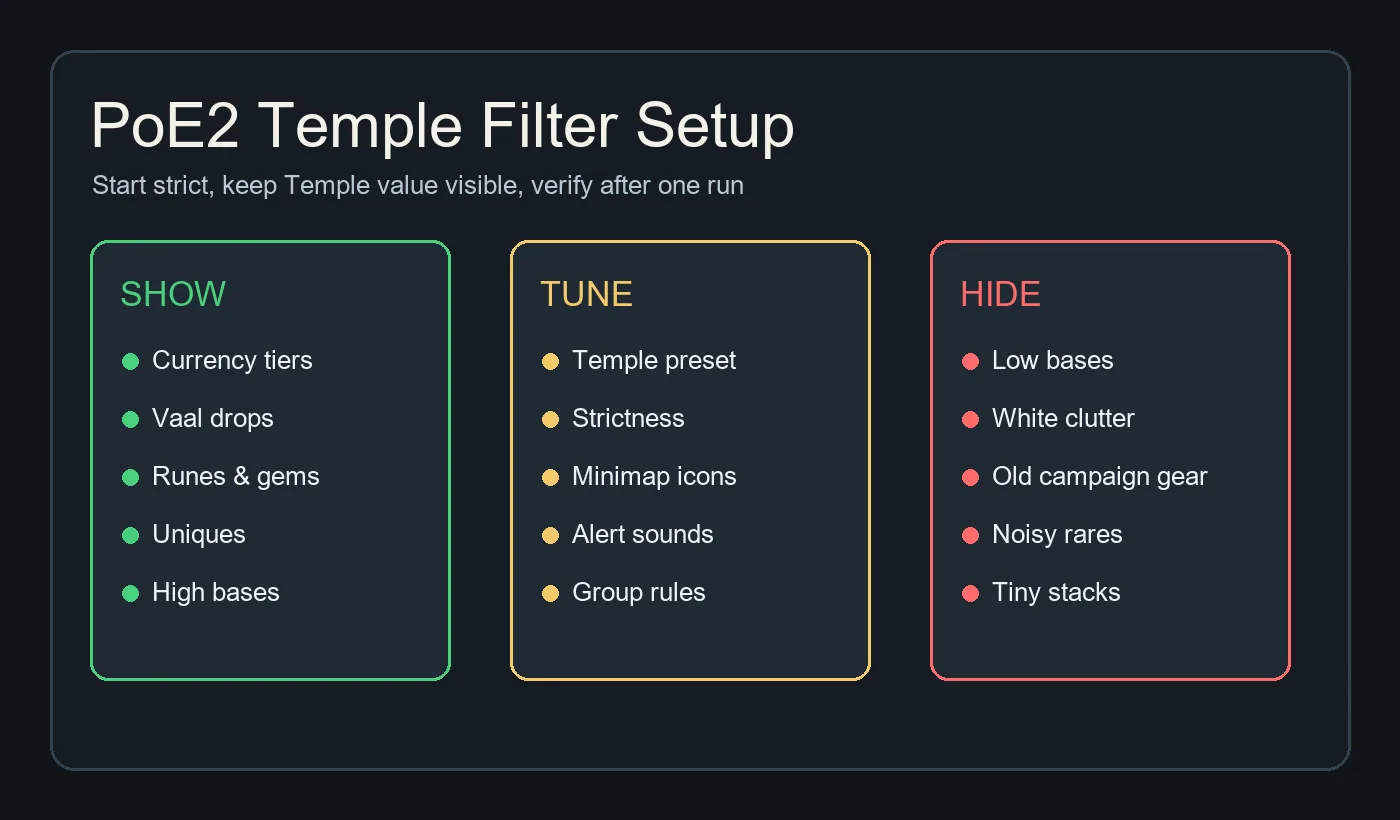
The visible categories should match the reason you opened the Temple. Currency tiers, valuable uniques, Vaal drops, runes, gems, and premium bases are the usual keepers. The exact list changes with patch economy, so use market-aware tools when possible and avoid copying a months-old pastebin as if it were permanent truth.
The categories to tune are more personal: alert volume, minimap icons, beam intensity, label size, and whether certain rare bases remain visible. These settings decide how the run feels. A filter that technically shows the right items but screams at every small drop is still a bad Temple filter.
- Keep value categories visible
- Tune strictness after one real run
- Use a separate Temple filter
- Do not rely on stale copied filters
The categories to hide are the ones that steal time without changing decisions: ordinary low-tier bases, outleveled campaign gear, weak magic items, and rares you never identify or sell. Hiding them is not elitism. It is how you keep attention available for the drops that matter.
PoE2 Temple Planner
Test the Temple layout before deciding how strict the filter should be.
Best PoE2 Temple layouts
Choose the run goal before tuning visible loot categories.
Planner fit
The PoE2 Temple Planner helps before the loot filter stage because it tells you what kind of run you are building. A currency-heavy layout needs stronger currency and unique visibility. A learning layout should stay more generous. A boss-focused or group layout can often be stricter because the run has a narrower reward expectation.
This is why the new page belongs on PoE2 Temple Planner without conflicting with the existing layout guides. The planner answers where rooms and paths should go. The filter guide answers what the screen should show once that plan turns into a run. Those are adjacent jobs, not duplicate pages.
- Keep value categories visible
- Tune strictness after one real run
- Use a separate Temple filter
- Do not rely on stale copied filters
Before you open a serious Temple, make the layout choice first, then the filter choice. If the layout is messy or experimental, do not hide too much. If the layout is optimized and you know exactly which drops you care about, tighten confidently.
PoE2 Temple Planner
Test the Temple layout before deciding how strict the filter should be.
Best PoE2 Temple layouts
Choose the run goal before tuning visible loot categories.
Troubleshooting
If your filter does not appear in game, confirm that the file has the .filter extension, that it is in the Path of Exile 2 documents folder if you are using a local file, or that the account-sync workflow completed if you are on console, GeForce Now, or a cloud setup. Restarting the client can help after adding a new local file.
If the filter shows too much, do not immediately jump to the harshest preset. First identify the noisy category. It is usually ordinary gear, low-value rares, or labels with large fonts and loud sounds. Tighten that layer only, then test again. If the filter hides too much, temporarily loosen strictness and check whether currency, uniques, runes, gems, and key bases are still visible.
- Keep value categories visible
- Tune strictness after one real run
- Use a separate Temple filter
- Do not rely on stale copied filters
If a copied filter feels wrong after a patch, replace it with a maintained source. Temple rewards and economy tiers can move. The best filter is not the oldest famous one; it is the one you can keep current.
PoE2 Temple Planner
Test the Temple layout before deciding how strict the filter should be.
Best PoE2 Temple layouts
Choose the run goal before tuning visible loot categories.
FAQ
Sources and further reading
These links are used for filter setup behavior, Temple preset context, and current item-filter terminology.
- PoE2Wiki item filter reference - Explains PoE2 item filter file behavior and setup notes.
- PoE2Filter custom loot filter generator - Maintained filter tool with presets, sync workflow, and filter philosophy.
- Path of Exile forum PoE2Filter Temple preset notes - Community tool update notes mentioning the Temple preset.
About the author
Elena Marlowe
Elena Marlowe writes PoE2 Temple Planner strategy features with an emphasis on clear decisions, current mechanics, and practical player workflows.
Plan the Temple before you tune the filter
Use the planner to understand which rooms and rewards your next run is built around, then tune the filter so those drops remain visible.